
1. How to use the archive
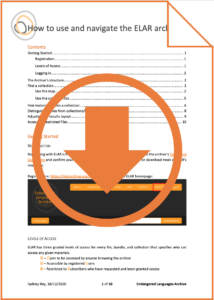
Click the image below for guidance on:
- How ELAR is organized
- How to register, log in, and request access
- How to find materials and collections
- How to use the interactive world map
If you need guidance as a language documenter or ELAR depositor,
please have a look at our Depositors’ Resource Collection.
2. Archive Structure
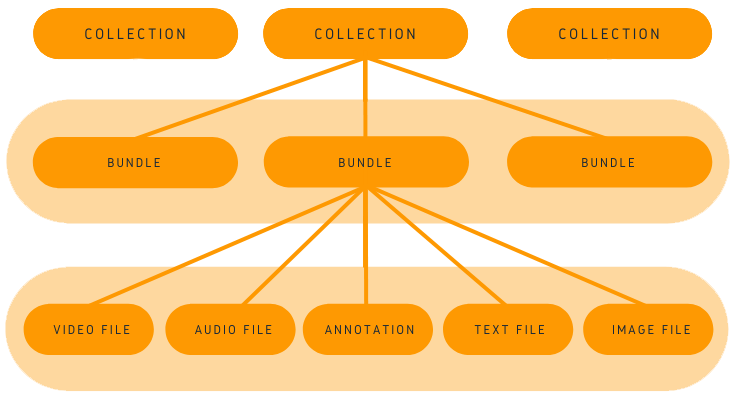
The archive is organized into a series of individual collections. A collection consists of bundles and each bundle contains a group of files. Files are bundled together in this way because they are all related to one particular event, whether they are pictures, transcriptions, and/or translations of recordings.
You can access collections, bundles, and files by clicking on the thumbnail images within the archive. There, you can either view the content of each file in a preview box or you can download the file depending on access level restrictions.
3. Accessing Materials
ELAR has three graded levels of access for every file, bundle, and collection that specifies who can access any given materials:
- O – Open to be accessed by anyone browsing the archive
- U – Accessible by registered Users
- S – Restricted to Subscribers who have requested and been granted access
In order to become a registered user, click HERE. Registering with ELAR is free and only takes a few minutes. Once you agree to the archive’s Terms and Conditions and confirm your email, you will be able to log in to stream or download most of ELAR’s resources.
Click the button below to request access to a Subscriber restricted collection, bundle, or file:

4. Terms and Conditions and Data Protection Statement
I acknowledge that these Terms and Conditions and Data Protection Statement apply to all collections, materials and uses of ELAR and agree to be bound by it.
“Collection” refers to a set of materials comprising a unit within the archive, based on e.g. a language or a group of languages. Each collection has a designated Collection Steward, who is responsible for all matters relating to the collection.
“Materials” refers to all or any part of digital data received, or played on any equipment, or any further material derived from or originating in the data received.
I will use the materials only for non-commercial private research or educational activity. Any other usage needs explicit written agreement from the Collection Steward and any other rights holders.
I will not transfer the materials to any other person or equipment, or do anything to allow such transfer to take place, unless permitted by an explicit written agreement from the Collection Steward and any other rights holders.
The materials may include documents that state further conditions of use or instructions for acknowledgement. I will make reasonable efforts to identify such documents and I will observe any stated restrictions or instructions.
If the materials are used in any way in the preparation of any publication, broadcast or dissemination, I will acknowledge ELAR and, if required, the Collection Steward and any other rights holders in the materials according to the citation instructions on the landing page of the respective collection(s). I will, wherever possible, send a copy of such publication to ELAR.
I will not knowingly use materials for any purpose which causes disparagement, disrespect, damage to reputation, or harm to any individual or group.
I understand that the materials are supplied “as is”, and are not guaranteed to fulfil any purpose or function, or to be compatible with any particular computing system or software. I release and indemnify ELAR from any damages or consequences resulting from my receipt or use of the materials. I understand that ELAR may take legal action on behalf of owners of materials in the case of serious infringement of this agreement.
ELAR collects personal data to create User Accounts, to facilitate users’ access to ELAR’s resources, and to manage, protect, and report usage of materials. ELAR will only collect such personal data as necessary to fulfil these purposes, which are in the legitimate interests of the ELAR and users and do not override users’ data protection rights and freedoms. ELAR will store data about users and their access to materials for as long as its discovery layer is operative for reporting purposes. In case of migration, the personal details collected by the legacy system will not be stored in a way that identifies the users. All personal data will be stored securely in accordance with the laws of the European Union. I understand that the data may identify me and may be shared with the owners of the materials and others only for the purposes of managing the materials. ELAR may contact me in the future about my account using the contact details I have provided.
If you wish to access the information ELAR holds about you, or you require further information on how ELAR processes your data, ELAR processes your data, please contact us via email at elar@elararchive.org.
TAKE DOWN POLICY
If you believe that material should be taken down or reviewed, please contact us by email at elar@elararchive.org or in writing at
Endangered Languages Archive
Berlin-Brandenburg Academy of Sciences and Humanities
Jägerstr. 22/23
10117 Berlin
Germany
Please provide the information detailed below:
- your name and contact details
- details of the material, including the URL at which the material was found
- the reason for why you think the material should be taken down or reviewed
- the reason for why you believe you are a right person to ask for this material to be taken down or reviewed
Upon receipt of a take-down request, ELAR will
- acknowledge the receipt
- make an initial assessment of the validity of the request
- if necessary, seek further advice from the Collection Steward or other suitable individuals or institutions as required
- if the request is deemed justified, take appropriate steps to protect or remove the material in question from ELAR
- provide a written response and confirmation of our actions
Where possible, the URLs and persistent identifiers of withdrawn items will continue to point to “tombstone” citations, to avoid broken links and to retain item histories, with:
- link to a replacement version, where available
- a note explaining the reasons for withdrawal